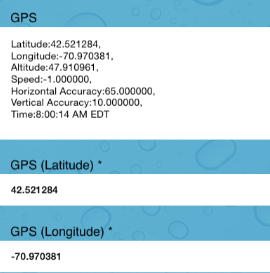
If your form has a GPS element, iDataCollect will allow you to capture a GPS location with the ability, if desired, to parse out the information into separate Latitude and Longitude fields.
GPS location data is captured based on the Wi-Fi triangulation or GPS readings using the CoreLocation library built into the iOS. iOS devices with GPS antennae (3G, 4G, LTE models) do not require internet connectivity as GPS works independently of 3G services. This means GPS location can be aquired in areas where there is no 3G signal.
To capture GPS location simply click on the field titled GPS in your form. The data is automatically populated once the field is open:
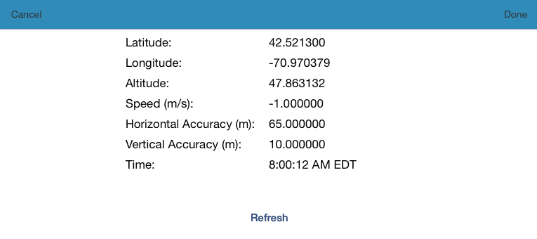
The field will provide horizontal accuracy and vertical accuracy automatically. If you are satisfied with the accuracy of the reading click "Done" in the upper right corner.
To delete these readings click "Cancel" in the upper left corner.
To try and capture a more accurate reading click "Refresh".
After clicking "Done" the form will navigate back to the main form and display the GPS information as well as the Latitude and Longitude field information: